Whisper AI for learning Japanese
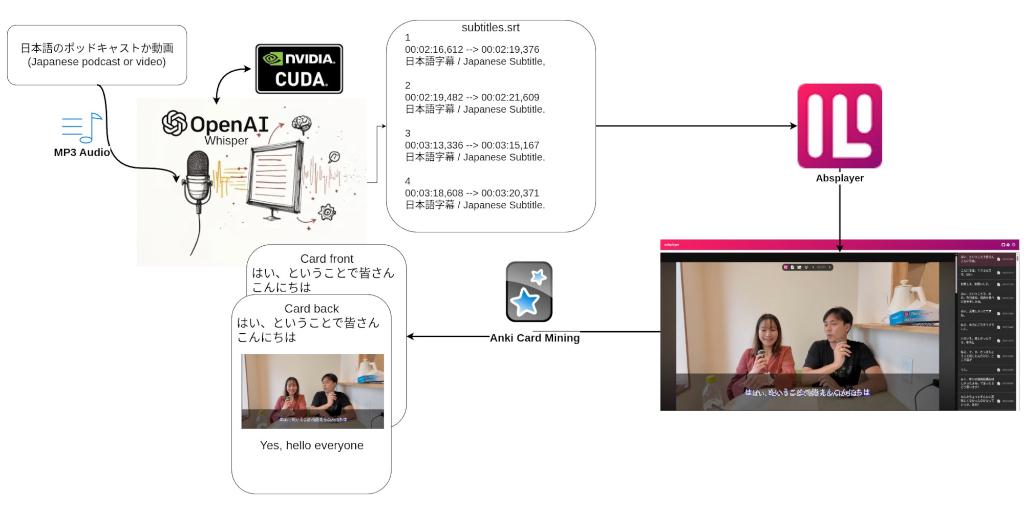
This project is intended for improving my Japanese learning by using OpenAI’s Whisper model to transcribe and translate subtitles to be used with an SRS (Spaced Repitition System) such as Anki.
Running local AI models
In order to run this setup for free OpenAI Whisper, Nvidia’s CUDA development kit alongside pytorch-cuda was installed and set up. This enabled me to run the large-v2 and large-v3 models, which had the best language accuracy at the time of setup. Getting CUDA to work correctly on an Arch-based system proved slightly difficult, since Nvidia doesn’t have installation guidelines for Arch or an official package. Once it was installed, however, it ran without issue.
Anki and using SRS
Anki is a Spaced Repetition System which uses flashcards, this means that you’ll have cards with a concepts on one side and the translation or explanation on the other. My flash cards have Japanese on the front and translations and images on the back.

Using a local language learning oriented video player
In order to use the subtitles transcribed by Whisper I use a video player called Asbplayer. It is intended for language learning and integrates directly with Anki. The benefit of using this is that once you click to “mine” a card, thus adding it to anki, the player will automatically grab the subtitles, translated subtitles, audio and a screenshot. This makes for great flashcards where you can get words in context.
The video player can also overlay other videos and allows you to mine directly from YouTube, Netflix, Crunchyroll and many more.
Mining from video games
Another approach to mining cards for Anki is playing video games. I have yet to use this approach, but I have tested it with the GameSentenceMiner.